15 July 2026 · By Lou
How to Build a Cohesive Twitch Channel Brand in 2026
Learn how to build a cohesive Twitch channel brand with the right colour scheme, matching overlays, and panels. Step-by-step guide to unifying your stream in 2026.
When someone clicks your stream in the browse page, they make a snap judgment. Your overlay, your panels, your colour scheme all feed into that first impression. A cohesive Twitch channel brand tells people you care about your channel. It makes your stream recognisable at a glance, whether they find you through a category page or a friend's raid.
Why Channel Branding Matters for Twitch Growth
Think about the channels you remember. They all have a distinct feel. Maybe it is a dark purple and cyan neon setup. Maybe it is a clean white and pastel pink look. The specific style matters less than the fact that it carries through every scene, every panel, every alert. That is what cohesive branding means.
Twitch viewers browse hundreds of streams. A channel with matching graphics stands out from one with mismatched random overlays. It signals professionalism and effort. And it makes your channel easier to find again when somebody scrolls past in a category list and spots your familiar colours.
If you are not sure where to start, you can browse premium stream packages that come with a full set of matching graphics. That takes the guesswork out of coordinating everything yourself.
Choose a Colour Scheme That Fits Your Style
Your colour scheme is the foundation of everything else. Pick two or three main colours and stick with them. One dominant colour, one accent, and maybe a neutral. That is all you need.
How to pick your colours
Think about the vibe you want. Neon blue and magenta feel futuristic and energetic. Deep red and gold feel bold and premium. Pastel pink and mint feel friendly and approachable. There is no wrong answer, but it helps to look at your profile picture, your game choice, and your personal style for cues.
Use a tool like Adobe Color or Coolors to build a small palette. Save it somewhere you can reference when you pick overlays, panels, and alerts. Every graphic you add should fit somewhere in that palette.
Stick to 2-3 colours max
Too many colours make a stream look busy. Your overlay frames the gameplay, it should not compete with it. Limit yourself to one dominant colour (covers most of your overlay), one accent colour (for highlights and borders), and one neutral (white, black, or grey for text and backgrounds).
For example, the Gothicon Fallen King Gold Stream Package uses black and gold with subtle red accents. Three colours, strong identity, clean look.
Pick Overlays That Match Your Brand
Once you have your colour palette, every overlay you add should fit it. That does not mean every overlay has to be the exact same shade. But they should look like they belong in the same channel.
Start with your main scene overlay
The gameplay overlay is what viewers see the most. It sets the tone for the whole channel. Pick one that matches your chosen colours and has the layout you need for your webcam, chat, alerts, and labels.
If you like a clean modern look, check out the Ghost Rising Deluxe Minimal Twitch Overlay Package. If you want something with more edge, the Based Bold Spray Paint Overlay brings a street art feel that carries through every element.
Add webcam frames and alerts
Your webcam border and alert graphics are the next place viewers notice inconsistency. If your overlay uses sharp angles and your webcam frame uses rounded corners, that mismatch sticks out. Most stream packages include matching webcam frames and alerts so you avoid this problem entirely.
Add Panels and Profile Graphics
Your Twitch panels are the section below your stream player. Viewers scroll down there to learn about you, see your schedule, find your social links, and check your gear. If your panels do not match your overlay, the brand falls apart the second they scroll.
Match your panel colours to your overlay
Use the same colour palette. If your overlay uses dark backgrounds and neon accents, your panels should too. If your overlay is light and airy, keep your panels in that same range. The Kyut Cute Stream Package is a good example of how matching panels and overlays work together in one unified set.
Keep the style consistent
Panels are small, simple graphics. They do not need to be complex. A consistent background colour, matching font, and the same accent colour for icons or dividers is enough. When everything matches from the stream scene down to the About section, viewers notice.
You can also find standalone free Twitch panels if you just need to update that part of your channel.
Keep Everything Consistent Across Scenes
Your channel has multiple scenes, and each one should feel like part of the same channel. The starting soon screen, the gameplay layout, the BRB screen, the ending screen. If each one looks completely different, you lose the cohesive brand.
Use a stream package for full consistency
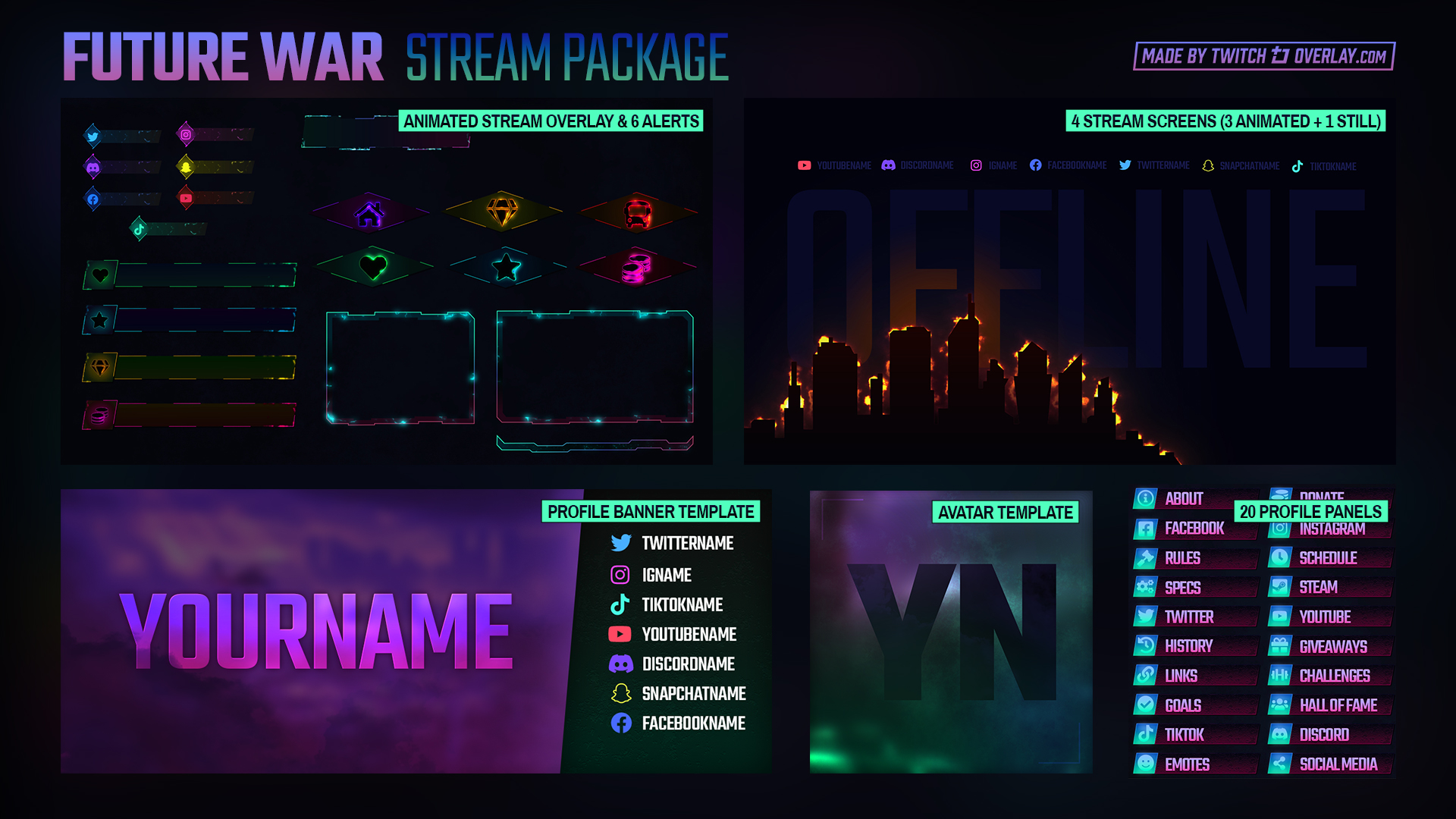
The easiest way to get this right is to use a full stream package instead of mixing individual overlays. A package comes with all the scenes, matching colours, matching fonts, and the same design language throughout. The Future War Electric Stream Package includes everything from the main overlay to stream screens to profile graphics, all in one matching set.
Check your scenes in order
Preview your channel in this sequence: starting soon, gameplay, BRB, ending. Do they look like they belong to the same creator? If one scene uses a different colour, swap it out. If a scene is missing an overlay, fill the gap with something from the same family.
If you are not ready for a full premium package yet, free overlays can still be consistent. Stick to one colour palette and use the same style of graphics. The Shinjukombo Red Neon Tokyo Overlay is a free download that works as a solid foundation for a red and black colour scheme.
Frequently Asked Questions
What is cohesive branding for a Twitch channel?
Cohesive branding means all your visual elements share the same colour palette, style, and design language. Your overlay, webcam frame, alerts, panels, and stream screens all look like they belong to the same channel instead of looking like random downloads.
How many colours should my Twitch brand use?
Stick to 2-3 colours. One dominant colour, one accent, and one neutral. This keeps your stream looking clean and makes it easier to find matching overlays and panels.
Can I use free overlays and still have a cohesive brand?
Yes. Pick a colour palette first, then choose free overlays and panels that fit into that palette. Keep the style consistent. Flat overlays pair with flat panels. Neon overlays pair with neon panels. The free downloads section has enough variety to build a full matching set if you stick to a plan.
Do I need a stream package or just an overlay?
A single overlay works fine if you only stream one type of content and do not use BRB or starting screens. A full stream package gives you matching graphics for every scene, plus panels and alerts. If you want a cohesive brand across your whole channel, go with a package.
How often should I update my channel branding?
There is no set schedule. Some creators update every few months to keep things fresh. Others stick with the same brand for years. If your channel changes direction or you get tired of the look, that is a good time to refresh.
Ready to Build Your Brand?
Start with a colour palette. Find overlays and panels that fit it. Keep the same look across every scene. That is all it takes to build a cohesive Twitch channel brand that viewers will recognise and remember.
Newsletter
Never Miss A New Overlay
New overlays, alerts and stream tips land regularly. Leave your email and we'll send the good ones straight to your inbox.
